
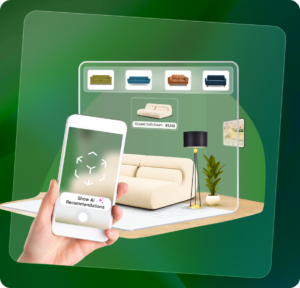
TheARoom
A cross-device AR (Augmented Reality) experience designed to bridge the gap between desktop browsing and mobile visualization in furniture e-commerce – helping reduce drop-offs and improve decision clarity for shoppers..
A concept case study addressing a common UX challenge in furniture e-commerce—where the technology exists, but the experience design prevents it from delivering value or influencing conversion.
Project Type: Concept / Strategic UX Case Study
Role: UX Research, Interaction Design, Prototyping, Usability Testing
Domain: Furniture E-commerce / Augmented Reality
At a glance
Furniture retailers are investing in AR to increase customer confidence, but most shoppers browse and compare on desktop while AR is available only on mobile. This disconnect breaks the decision journey, causing drop-offs and preventing AR from meaningfully improving conversions.
Analyzed cross-device shopping behavior and identified device switching and loss of context as key friction points. The solution focused on creating a seamless handoff between desktop browsing and mobile AR, preserving session continuity and minimizing user effort.
The concept demonstrates how making AR accessible at the moment of decision can increase visualization usage, improve purchase confidence, and reduce drop-offs. Usability testing indicated that preserving context significantly improves the experience.
Overview
TheARoom is a cross-device AR experience designed for modern e-commerce. It enables furniture shoppers browsing on desktop to instantly launch mobile AR, visualize products in their real space, and return to checkout without losing context — increasing purchase confidence, reducing returns, and unlocking higher conversion from existing AR investments.
TheARoom explores how cross-device interaction can help furniture retailers unlock the real value of their AR investments.
The project was developed as a strategic concept based on industry research, behavioral patterns observed in e-commerce, and usability testing of interactive prototypes. The goal was to design a solution that:
- Enables visualization without interrupting the shopping journey
- Preserves browsing context
- Reduces friction
Expected Business Impact
While this project is a strategic concept, the following outcomes are projected based on user research, usability testing insights, and industry patterns observed in AR-driven e-commerce.
Making AR accessible directly from desktop enables more high-intent shoppers to visualize products at the moment of decision.
Seamless cross-device transitions eliminate the need to re-search products, reducing abandonment during the evaluation stage.
Accurate visualization and AI-assisted recommendations help users make informed decisions, increasing confidence and reducing returns.
Research
Secondary Research & Competitor Analysis →
The AR market is projected to reach $50 billion by 2025, driven by its adoption in e-commerce and retail sectors (Statista). 61% of shoppers prefer retailers offering AR experiences, as it helps them visualize products in their spaces before purchasing (Retail Perceptions Report, 2021). 73% of users switch between devices while shopping, expecting a seamless and consistent experience across platforms (Google Insights, 2022).
AR enables users to visualize products in real-life settings, boosting confidence in their purchases (Deloitte Digital Consumer Report, 2022).
By offering accurate product previews, AR reduces product returns by 22% (Forbes, 2021). AR provides convenience for users with busy schedules or limited mobility by eliminating the need for in-store visits (PwC Future of Retail Report, 2023).
The AR market is projected to reach $50 billion by 2025, driven by its adoption in e-commerce and retail sectors (Statista). 61% of shoppers prefer retailers offering AR experiences, as it helps them visualize products in their spaces before purchasing (Retail Perceptions Report, 2021). 73% of users switch between devices while shopping, expecting a seamless and consistent experience across platforms (Google Insights, 2022).
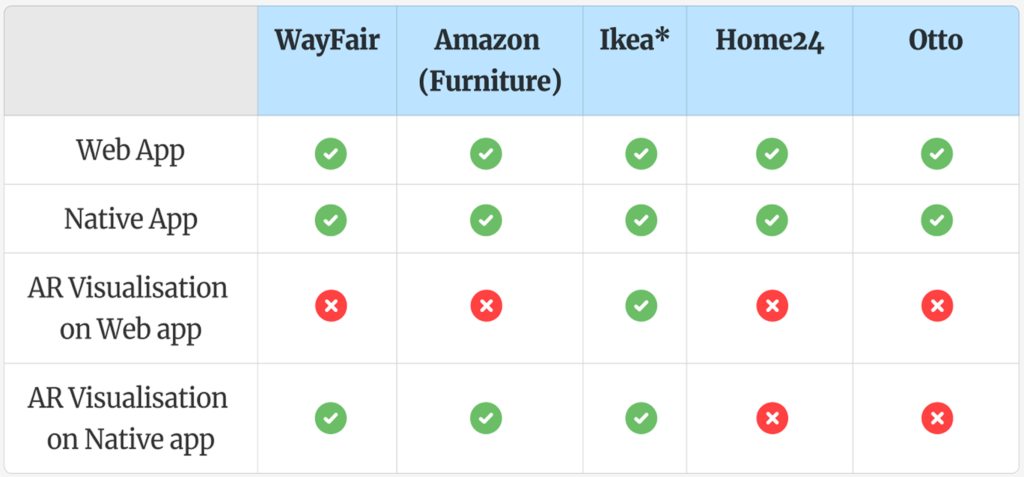
Shoppers frequently switch between devices during purchase journeys.
Visualization improves purchase confidence and reduces returns.
Friction in cross-device transitions negatively impacts conversion.
These findings suggested that accessibility and timing of AR matter more than the technology itself.
Primary Research →
Customers:
Do not want to download the app just to use the AR feature
Inability to keep browsing on the laptop along side working on Interior design projects
Wish there were easy collaborations so i can easy share projected products with my client / partner / colleague
Want to see personalised results while using the AR feature in my space
Prefer to work on Laptop, frustrated with discontinuity between laptop and mobile to view products in AR
Need an easy to use platform and technology to choose furniture for my living space
Want to be able to also use my home pictures with AR instead of being there physically
Like to browse products & work on big screen but hate to restart search on phone app to use AR
Easy and clear AR visualisation that does not require high-tech savviness
Drop search and jump to other options when unable to seamlessly switch between devices
Like to browse products & work on big screen but hate to restart search on phone app to use AR
Should be able to complete my shopping journey just on one device, possible on phone yet but not on desktop
Business:
Better AR visualisation will result in less returns helping our business
Consumers will have more confidence and faith when their virtual experience is very close to real
AR solution that can be very easy to use both on laptops and mobile
Customers are likely to drop out when they have to restart their search on the app
Artificial intelligence for personalised results from the inventory can be very beneficial
AR uses mobile, but an easy bridge between Laptop and mobile enabling easy access to this technology can change the game
Key Insights →
Users who reached AR showed higher intent — but most never did because it was locked behind a mobile-only flow.
Customers used large screens to compare dimensions, prices, and layouts, yet were forced to leave that context to visualize — breaking momentum at the most critical funnel stage.
Re-finding products, variants, and prices on mobile created abandonment, not lack of interest in AR.
User Personas →
Persona 1

Minal designs living and work spaces for her clients. Her work involves curating furniture, lifestyle products that best fits the spaces she designs. She relies on design softwares and her laptop/desktop for her work. She frequently shares her ideas and designs with her clients and team.
Goals
- Provide clients with immersive, realistic visualisations/ previews of furniture within their spaces.
- Easy and smooth sharing of projected furnitures with her team and clients.
Needs
- Seamless and time-efficient furniture browsing with a smooth workflow across devices.
- One-click access to the AR visualisation feature with effortless device switching.
- Smart AI-driven recommendations for a more effective research experience.
Pain Points
- Switching between multiple tools and devices disrupts the workflow.
- Search and customisations are time-consuming and require extensive back-and-forth.
- Lack of real-time collaboration making remote client consultations challenging.
Persona 2

Daniel owns a well-established furniture store with both a physical showroom and an online presence. As shopping habits shift towards digital experiences, he wants to enhance his e-commerce offerings to improve customer satisfaction and reduce return rates. He is exploring AR solutions to help customers visualise furniture in their homes before purchasing.
Goals
- Enhance digital shopping experiences to attract more online buyers.
- Reduce product returns and exchanges by improving customer confidence.
- Keep up with digital trends to stay competitive in the market.
Needs
- Provide an immersive AR feature that enables a smooth interaction between the customer the products.
- User-friendly AI-driven solutions that doesn’t require technical expertise.
Pain Points
- Customers hesitate to purchase furniture online without seeing it in their space.
- High customer drop rate when browsing on laptops and need to restart the search on their phones to use the AR visualisation feature.
- High return rates due to mismatched expectations.
User Journey
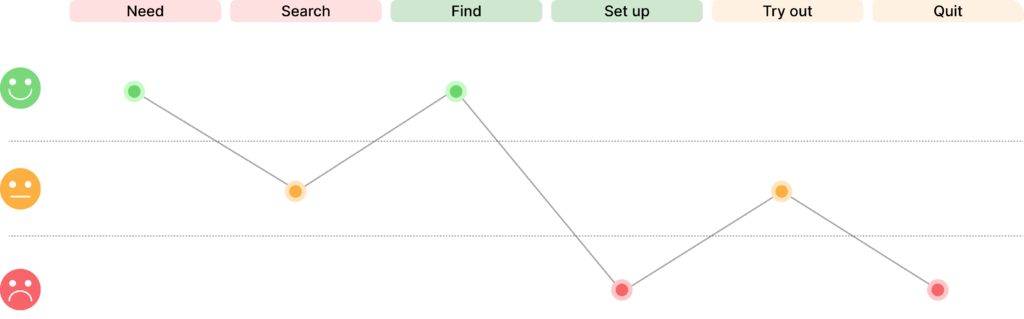
- Minal gets a new client eager to decorate his new home. Excited about the project, she visits the site and begins brainstorming furniture ideas. On-site, she searches for exquisite pieces on her laptop, exploring various websites with beautiful options.
- She finds a sofa for the living room but can’t visualise it in the space since most websites lack AR features. Instead, she manually edits images in design software to create a mood board, a time-consuming process requiring multiple iterations.
- She finds a website that shows AR feature that can help project the furniture onto her client’s space. She enthusiastically opens up to start testing the feature.
- She opens up the product and sees a message “Download the app / use your phone to use the AR feature”. She takes her phone, opens the web app but gets frustrated to start searching the same product all over again.
- She finally searches the same product, uses the AR feature but does not really like it projected in the room. She wants to see other options that best suits the living room. She wants to browse more products on her laptop as she prefers to work on big screens.
- She starts working back on her laptop and found another sofa. She does not want to go through all those steps again, she drops the AR feature and continue her work without that.
Ideation
Key challenge: enabling users to transition seamlessly between devices while exploring furniture in augmented reality. Users, especially professionals and collaborators, often switch between desktops, tablets, and smartphones when browsing, visualising, and making purchase decisions. Interruptions in this process can lead to frustration, inefficiency, and increased drop-off rates affecting businesses and users productivity alike.
To solve this, I designed a cross-device continuity feature that ensures users can start their browsing on one device and effortlessly continue AR visualisation on another without losing progress. This eliminates the need for manual re-uploads or repeated selections, creating a fluid and intuitive experience.
To effectively demonstrate this feature, I created two key pages for the product website. While these pages are not part of the core solution, they serve to highlight how users can browse furniture on their desktop or laptop, seamlessly transition to their mobile device to initiate an AR projection in their real space and then return to their laptop to continue browsing and working. This integration showcases TheARoom’s ability to provide a frictionless, time-saving workflow for both professionals and individual users.
With this foundation in place, I moved on to designing the user interface, ensuring a smooth, intuitive, and visually engaging experience with the following must-haves.
Options Considered
- WebAR on desktop (rejected)
- Prompt app download (low adoption)
- QR handoff (selected)
Why QR Wins
- No rebuild of AR tech
- Preserves context
- Quick to implement
It needs a feature that –
– is easy to use – seamlessly opens on a new device – enables instant photo capturing – maintains the process continuity – provides instant photo sharing option – enables direct product link sharing – enables browsing without a native app – enables direct add-to-cart – allows canceling & resuming search in same category.
Current available AR visualisations –
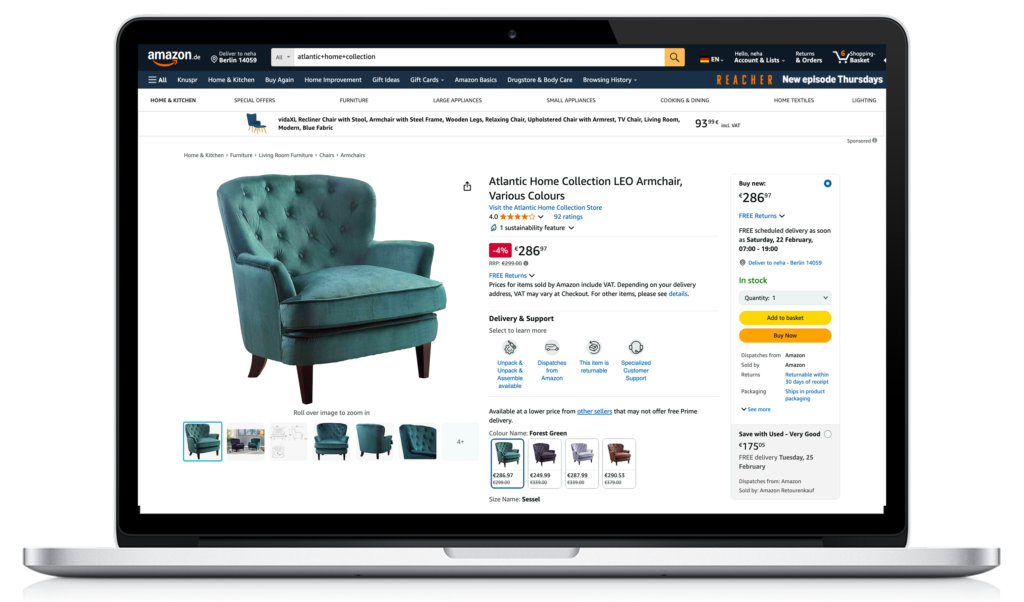
Absence of AR visualisation feature on Amazon website.
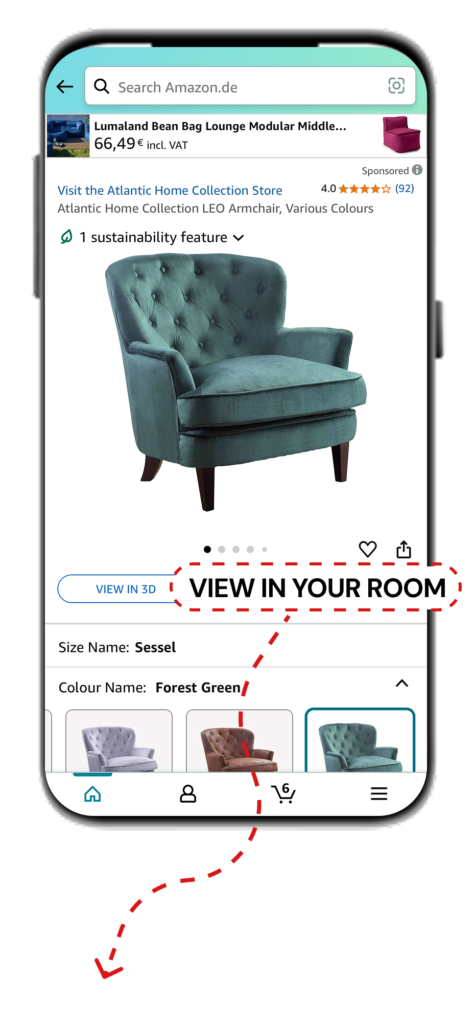
AR visualisation feature on Amazon native app.
Feature Interaction Design and Prototype Video
Part 1: Click on the video screen to play/pause. (1m 7s)
Part 2: Click on the video screen to play/pause. (1m 44s)
Usability Testing
The goal of the usability test was to evaluate how easily users could browse furniture, visualise it in AR, and transition seamlessly between devices saving time without losing progress.
| Objective | Tasks (What Users Did) | Results (What Worked Well) | Issues (Challenges Faced & Areas to Improve) |
|---|---|---|---|
| Seamless transition from laptop to phone to use AR visualisation | Users selected a product and switched to AR mode on their phone via a simple QR scan | No drop-offs; users smoothly transferred their search to the phone without interruptions | No major issues were found with the transition |
| Successful AR visualisation | Users placed furniture in their space using AR | The AR feature accurately projected furniture in users’ spaces, aiding decision-making without drop-offs | Some users faced challenges with scaling the projected furniture to match their real-world space |
| Personalised AI generated results | Users received AI-powered product recommendations | The AI suggestions aligned well with user expectations and preferences | Some users felt the recommendations could be improved with additional filters for customization |
| Efficiently capturing projected product images | Users took snapshots of the projected furniture in their space | Users found it easy to capture and save product images | Some users expected a “preview before saving” feature |
| Seamless sharing of the product links and images | Users shared product images and links with others | Sharing was quick and intuitive, allowing for easy collaboration | No challenges were found with the sharing of product links & images |
Additional User Observations & Insights
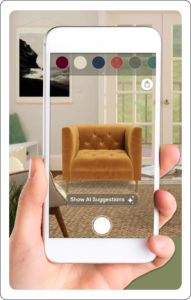

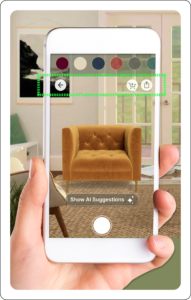
Before
1. An option to take a quick screen capture of the projected item.
2. CTA to browse AI powered personalised results.
3. CTA to share the product link.
After
1. CTA to be able to add the product in the cart.
2. CTA to be able to share the product link directly.
3. CTA to go back to the product description page from the AR view.
Next Steps & Improvements
- Image-based AR Visualization
Enable users to upload photos of a room or space to visualize furniture in AR without needing to be physically present. This would support interior designers and remote planning workflows. - Enhanced Personalization
Expand AI recommendations using room context, user preferences, and browsing behavior to provide more relevant suggestions. - Analytics & Validation
Measure AR engagement, cross-device transitions, and conversion behavior to validate business impact and guide future iterations.